
How to Generate Portal Links and Locate Your ACCT_DBKEY
Each PropertyBoss domain (database) has its own set of portal links used by residents, owners, maintenance technicians, and the public.
PropertyBoss must initially set up your portals. However, once portals are enabled, you can generate your portal links using your Domain DB Key (ACCT_DBKEY).
IMPORTANT: Portal links are split by DOMAIN / DATABASE, not by accounting file.
- 1 domain = 1 set of portal links
- 2 domains = 2 different sets of portal links
- If you have one domain with multiple accounting files, you still have one portal link per portal type
Portal Link Templates
Replace ACCT_DBKEY in the links below with your Domain DB Key.
Available Portal Links
Listings Portal: Used to advertise available property listings
https://list_ACCT_DBKEY.propertyboss.net
MaintTech Portal: Used by maintenance technicians
https://mtt_ACCT_DBKEY.propertyboss.net
Third‑Party Owners Portal: Used by third‑party owners to view property information/reports
https://own_ACCT_DBKEY.propertyboss.net
Direct Payment Portal: Used for collecting one‑time payments without logging into the Resident Portal
https://pay_ACCT_DBKEY.propertyboss.net
Tenant / Prospect Portal (Resident/Member): Used by tenants, prospects, and members of HOA communities
https://res_ACCT_DBKEY.propertyboss.net
How Do I Locate My ACCT_DBKEY?
Follow the steps below to find your Domain DB Key, which replaces ACCT_DBKEY in the portal links above.
Steps
Log in to PropertyBoss Online - https://online.propertyboss.net
- Launch PropertyBoss
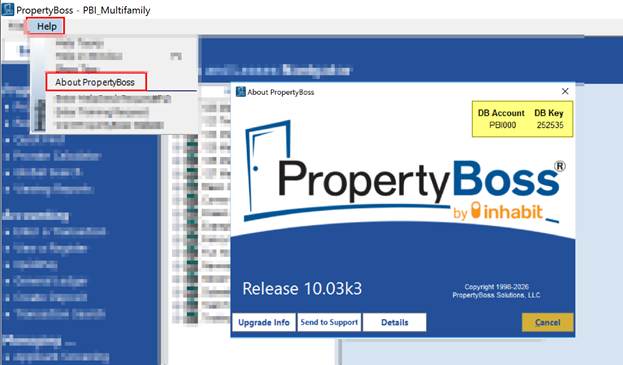
- In the top‑left corner, click Help
- Select About PropertyBoss
- A window will open displaying:
- Account Number
- Domain DB Key
Important Notes
- The Domain DB Key replaces ACCT_DBKEY in all portal links
- Each domain has one unique DB Key and one set of portal links
Example: Creating Your ACCT_DBKEY
If the Account Number is PBI000 and the Domain DB Key is 252535. The full ACCT_DBKEY would be: PBI000_252535
Plug the ACCT_DBKEY into the portal links like this:
- Listings Portal
https://list_PBI000_252535.propertyboss.net - MaintTech Portal
https://mtt_PBI000_252535.propertyboss.net
(Repeat for all portal types as needed)